Categories
College Bookssss >
BA PU Chandigarh
BSC PU Chandigarh
MSC PU Chandigarh
BBA PU Chandigarh
MA PU Chandigarh
Medical Books
Engineering Books
Management Books
PGDCA Books
BCOM PU Chandigarh
MCOM PU Chandigarh
BCA PU Chandigarh
MCA PU Chandigarh
animate-books

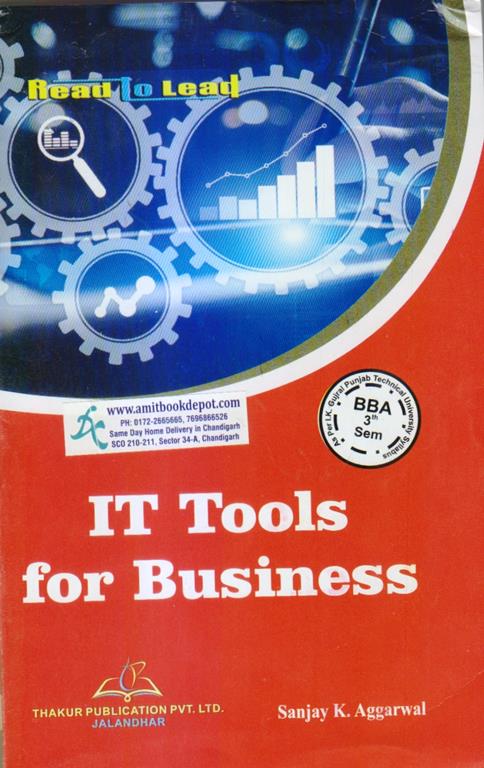
thakur it tools for business bba 3rd sem

by Madhurima
β‚Ή220 β‚Ή220.00(-/ off)

Rating & Reviews

23 Customer Review

Thakur: Tools for Businessβ€”BBA 3rd Sem by Prof. Sanjan K. Aggarwal is a syllabus-specific book for Bachelor of Business Administration students. This comprehensive guide covers essential IT tools for business, starting with computer fundamentals, hardware, software, and data representation. It provides detailed insights into the Windows operating system and offers practical, step-by-step training in MS Office 2007 applications, including MS Word, MS PowerPoint, and MS Excel. Designed to achieve key course outcomes, this book helps students build proficiency in office management tools, data analysis, and presentation skills, making it an indispensable resource for academic success and future business professionalism.

Have Doubts Regarding This Product ? Ask Your Question

  • Q1
    Is this book strictly aligned with the BBA 3rd Semester syllabus for 'IT Tools for Business'?
    A1

    Yes, this book, "Thakur: Tools for Business," is specifically written and structured to cover the entire prescribed syllabus for BBA-SEC 301, including all units and learning objectives.

  • Q2
    Which versions of Microsoft Office are covered in this textbook?
    A2

    The book provides detailed, practical training based on Microsoft Office 2007, covering MS Word, MS PowerPoint, and MS Excel.

  • Q3
    I am a complete beginner in computers. Is this book suitable for me?
    A3

    Absolutely. The book starts with the very basics of computer fundamentals, including hardware, software, and number systems, making it ideal for students with limited prior knowledge.

  • Q4
    Are topics like number system conversion and data representation explained clearly?
    A4

    Yes, Unit I provides a dedicated and detailed explanation of number systems (Decimal, Binary, Octal, Hexadecimal) and their interconversion, which is a fundamental part of the curriculum.

  • Q5
    Does the book cover both theoretical concepts and practical software skills?
    A5

    Yes, it offers a balanced approach. The first two units focus on theoretical computer fundamentals and software concepts, while the last two units are dedicated to hands-on, practical training in MS Office applications.

  • Q6
    Is the Windows Operating System section based on a specific version like Windows XP or Windows 10?
    A6

    The syllabus and the book's content provide a general introduction to the Windows Operating System, covering fundamental concepts of file and directory management that are applicable across various versions, including Windows 95, 98, 2000, and XP.

  • Q7
    Are advanced Excel functions like financial and statistical formulas covered?
    A7

    Yes, the MS-Excel unit covers the calculation of various financial and statistical functions using formulas, which is crucial for business data analysis.

  • Q8
    Can this book be useful for self-study outside of a formal university course?
    A8

    While it is designed for the BBA curriculum, anyone looking to build a strong foundation in computer basics and learn the core functionalities of MS Office 2007 can use it for effective self-study.

  • Q9
    What is the writing style of the book? Is it technical or student-friendly?
    A9

    The book is written in a clear, concise, and academic yet student-friendly style, with a focus on explaining complex topics in an accessible way to ensure learning comprehension.

  • Q10
    Does the book guide you on how to use features like Mail Merge in MS Word?
    A10

    Yes, the MS Word chapter includes a comprehensive guide to using advanced features like Mail Merge, which is essential for creating business letters and mass communications.

0.00

0 Overall Rating
  • 5
    0
  • 4
    0
  • 3
    0
  • 2
    0
  • 1
    0

Try this product & share your review & thoughts

UNIT: COMPUTER FUNDAMENTALS
1. Computer Fundamentals
2. Classification of Computers
3. Hardware
4. Firmware
5. Humanware
6. Data Representation
7. Number System
8. Number Conversion
9. Exercise

UNIT - 2: COMPUTER SOFTWARE IS WINDOWS OS
1. Computer Software
2. Computer Language
3. Language Translators
4. Computer Memory
5. Windows Operating System
6. Exercise

UNIT - 3: INTRODUCTION TO MS - WORD AND MS - POWERPOINT
1. MS Word 2007
2. MS PowerPoint 2007
3. Exercise

UNIT - 4: INTRODUCTION TO MS-EXCEL
1. MS-Excel 2007
2. Exercise
BBA-SEC 301 IT Tools for Business

Course Objective: The purpose of this course is to provide a thorough exposure to the operating and office management tools available in different packages. A student can be exposed to the working knowledge of Windows-based operating systems and software packages such as Windows 95, 98, 2000 Professional, Windows XP, and MS Office.

Course Outcomes (COs): After completion of the course, the students shall be able to:
CO1: Develop understanding of computer fundamentals, functions, and their classifications.
CO2: Develop a clear understanding and knowledge about the functioning of computer software and the Windows operating system.
CO3: Demonstrate proficiency in Microsoft Word & Excel.
CO4: Apply formatting and editing features to enhance worksheets.
CO5: Use styles, themes, and conditional formats to customize worksheets.

Unit –I

Computer Fundamentals: Data, Instruction, and Information; Characteristics of Computers; Various Fields of Application of Computers; Input-Output Devices (Hardware, Software, Humanware, and Firmware); Advantages and Limitations of Computers; Block Diagram of Computer, Function of Different Units of Computer, Classification of Computers, Data Representation: Different Number Systems (Decimal, Binary, Octal, and Hexadecimal) and their interconversion.

Unit – II

Computer Software: Types of Software, Application Software, and System Software, Compiler and Interpreter, Generations of Languages, and Low- and High-Level Languages.
Computer Memory: Primary Memory & Secondary Memory. Storage Media. Introduction to Windows Operating System: All Directory Manipulation: Creating Directory, Subdirectory, Renaming, Copying, and Deleting the Directory File Manipulation: Creating a file, deleting, copying, and renaming a file using accessories such as a calculator, paintbrush, and CD player, etc.

Unit – III

MS-Word: History, Creating, saving, opening, importing, exporting, and inserting documents; formatting pages; and aligning paragraphs and sections. Indents and outdents, creating lists and numberings Formatting Commands: Headings, Styles, Fonts, and Size Editing, Viewing Text, Finding and Replacing Text, Headers and Footers, Inserting page breaks, page numbers, special symbols, and dates Mail merge, preview, and printing command.
MS-PowerPoint: History, Creating, Saving, Opening, Existing Presentation, Creating and Saving a Presentation using Auto Content Wizard, Design Template, or Blank Presentation Slide Sorter View, Slide Show, Inserting Pictures and Graphics, and Printing Slides.

Unit –IV

MS-Excel: Introduction, Components of Excel History, Creating, saving, opening, spreadsheet, formatting numbers and text, graph and chart formatting commands, menu bar, toolbars, producing charges, protecting cell macro and printing operation, spell checking, cell editing, and calculation of various financial and statistical functions using formulas.

Note: Relevant case studies should be discussed in class. 

Thakur: Tools for Businessβ€”BBA 3rd Semester by Prof. Sanjay K. Aggarwal is an authoritative and comprehensive book, meticulously designed to align with the curriculum for Bachelor of Business Administration students. Published by Thakur Publishers, this book serves as an indispensable guide for mastering the IT tools for business that are fundamental to modern corporate operations. The primary objective of this text is to build a strong foundation in computer fundamentals and provide hands-on proficiency in essential software applications, thereby empowering future business professionals to operate with efficiency and confidence in a technology-driven environment.

Structured to meet the specific syllabus requirements, the book begins with Unit I: Computer Fundamentals, providing a deep dive into the core concepts of computing. Students will gain a clear understanding of data, information, and the defining characteristics of computers. The unit elaborately covers the classification of computers, detailed explanations of hardware, firmware, and humanware, and the crucial concepts of data representation. A significant focus is placed on number systems, including decimal, binary, octal, and hexadecimal, and their interconversion, forming the bedrock of understanding how computers process information.

Unit II seamlessly transitions into Computer Software and Windows OS. It demystifies the different types of software, distinguishing between application software and system software. Key concepts such as computer language evolution, the role of language translators like compilers and interpreters, and the intricacies of computer memory (both primary and secondary) are explained with clarity. This unit offers a practical introduction to the Windows operating system, guiding students through essential directory and file manipulation tasks, which are critical for effective file management in a business setting.

The book then progresses to the practical application of office management tools with Unit III: Introduction to MS-Word and MS-PowerPoint. Focusing on the widely used 2007 versions, this section provides a step-by-step guide to mastering MS Word 2007. It covers everything from creating, saving, and formatting documents to advanced features like mail merge, headers and footers, and styles. Similarly, the MS PowerPoint 2007 section equips students with the skills to create compelling presentations using various methods, including design templates and blank presentations, ensuring they can communicate business ideas effectively.

Unit IV is dedicated to Introduction to MS-Excel, a vital tool for any business analyst. This unit thoroughly explores MS-Excel 2007, from its basic components and history to practical functions like formatting worksheets, creating graphs and charts, and protecting cells. It emphasizes the application of various financial and statistical functions using formulas, enabling students to perform complex data analysis and calculations, a key course outcome for the program.

Beyond just theory, this book is crafted to achieve the defined Course Outcomes (COs). It ensures students can develop a clear understanding of computer functions and classifications, gain knowledge of software and operating systems, and demonstrate proficiency in Microsoft Word & Excel. The book specifically guides learners on how to apply formatting and editing features to enhance worksheets and use styles, themes, and conditional formatting to customize their work, directly addressing the learning objectives of the syllabus.

Each chapter is reinforced with exercises, and the syllabus suggests the discussion of relevant case studies, making it not just a book but a complete learning package. Thakur: Tools for Business is the definitive academic resource for BBA students, providing the essential computer fundamentals and software skills needed to excel in their academic pursuits and future business careers.

UNIT: COMPUTER FUNDAMENTALS
1. Computer Fundamentals
2. Classification of Computers
3. Hardware
4. Firmware
5. Humanware
6. Data Representation
7. Number System
8. Number Conversion
9. Exercise

UNIT - 2: COMPUTER SOFTWARE IS WINDOWS OS
1. Computer Software
2. Computer Language
3. Language Translators
4. Computer Memory
5. Windows Operating System
6. Exercise

UNIT - 3: INTRODUCTION TO MS - WORD AND MS - POWERPOINT
1. MS Word 2007
2. MS PowerPoint 2007
3. Exercise

UNIT - 4: INTRODUCTION TO MS-EXCEL
1. MS-Excel 2007
2. Exercise

Have Doubts Regarding This Product ? Ask Your Question

  • Q1
    Is this book strictly aligned with the BBA 3rd Semester syllabus for 'IT Tools for Business'?
    A1

    Yes, this book, "Thakur: Tools for Business," is specifically written and structured to cover the entire prescribed syllabus for BBA-SEC 301, including all units and learning objectives.

  • Q2
    Which versions of Microsoft Office are covered in this textbook?
    A2

    The book provides detailed, practical training based on Microsoft Office 2007, covering MS Word, MS PowerPoint, and MS Excel.

  • Q3
    I am a complete beginner in computers. Is this book suitable for me?
    A3

    Absolutely. The book starts with the very basics of computer fundamentals, including hardware, software, and number systems, making it ideal for students with limited prior knowledge.

  • Q4
    Are topics like number system conversion and data representation explained clearly?
    A4

    Yes, Unit I provides a dedicated and detailed explanation of number systems (Decimal, Binary, Octal, Hexadecimal) and their interconversion, which is a fundamental part of the curriculum.

  • Q5
    Does the book cover both theoretical concepts and practical software skills?
    A5

    Yes, it offers a balanced approach. The first two units focus on theoretical computer fundamentals and software concepts, while the last two units are dedicated to hands-on, practical training in MS Office applications.

  • Q6
    Is the Windows Operating System section based on a specific version like Windows XP or Windows 10?
    A6

    The syllabus and the book's content provide a general introduction to the Windows Operating System, covering fundamental concepts of file and directory management that are applicable across various versions, including Windows 95, 98, 2000, and XP.

  • Q7
    Are advanced Excel functions like financial and statistical formulas covered?
    A7

    Yes, the MS-Excel unit covers the calculation of various financial and statistical functions using formulas, which is crucial for business data analysis.

  • Q8
    Can this book be useful for self-study outside of a formal university course?
    A8

    While it is designed for the BBA curriculum, anyone looking to build a strong foundation in computer basics and learn the core functionalities of MS Office 2007 can use it for effective self-study.

  • Q9
    What is the writing style of the book? Is it technical or student-friendly?
    A9

    The book is written in a clear, concise, and academic yet student-friendly style, with a focus on explaining complex topics in an accessible way to ensure learning comprehension.

  • Q10
    Does the book guide you on how to use features like Mail Merge in MS Word?
    A10

    Yes, the MS Word chapter includes a comprehensive guide to using advanced features like Mail Merge, which is essential for creating business letters and mass communications.

BBA-SEC 301 IT Tools for Business

Course Objective: The purpose of this course is to provide a thorough exposure to the operating and office management tools available in different packages. A student can be exposed to the working knowledge of Windows-based operating systems and software packages such as Windows 95, 98, 2000 Professional, Windows XP, and MS Office.

Course Outcomes (COs): After completion of the course, the students shall be able to:
CO1: Develop understanding of computer fundamentals, functions, and their classifications.
CO2: Develop a clear understanding and knowledge about the functioning of computer software and the Windows operating system.
CO3: Demonstrate proficiency in Microsoft Word & Excel.
CO4: Apply formatting and editing features to enhance worksheets.
CO5: Use styles, themes, and conditional formats to customize worksheets.

Unit –I

Computer Fundamentals: Data, Instruction, and Information; Characteristics of Computers; Various Fields of Application of Computers; Input-Output Devices (Hardware, Software, Humanware, and Firmware); Advantages and Limitations of Computers; Block Diagram of Computer, Function of Different Units of Computer, Classification of Computers, Data Representation: Different Number Systems (Decimal, Binary, Octal, and Hexadecimal) and their interconversion.

Unit – II

Computer Software: Types of Software, Application Software, and System Software, Compiler and Interpreter, Generations of Languages, and Low- and High-Level Languages.
Computer Memory: Primary Memory & Secondary Memory. Storage Media. Introduction to Windows Operating System: All Directory Manipulation: Creating Directory, Subdirectory, Renaming, Copying, and Deleting the Directory File Manipulation: Creating a file, deleting, copying, and renaming a file using accessories such as a calculator, paintbrush, and CD player, etc.

Unit – III

MS-Word: History, Creating, saving, opening, importing, exporting, and inserting documents; formatting pages; and aligning paragraphs and sections. Indents and outdents, creating lists and numberings Formatting Commands: Headings, Styles, Fonts, and Size Editing, Viewing Text, Finding and Replacing Text, Headers and Footers, Inserting page breaks, page numbers, special symbols, and dates Mail merge, preview, and printing command.
MS-PowerPoint: History, Creating, Saving, Opening, Existing Presentation, Creating and Saving a Presentation using Auto Content Wizard, Design Template, or Blank Presentation Slide Sorter View, Slide Show, Inserting Pictures and Graphics, and Printing Slides.

Unit –IV

MS-Excel: Introduction, Components of Excel History, Creating, saving, opening, spreadsheet, formatting numbers and text, graph and chart formatting commands, menu bar, toolbars, producing charges, protecting cell macro and printing operation, spell checking, cell editing, and calculation of various financial and statistical functions using formulas.

Note: Relevant case studies should be discussed in class. 

0.00

0 Overall Rating
  • 5
    0
  • 4
    0
  • 3
    0
  • 2
    0
  • 1
    0

Try this product & share your review & thoughts

Top Trending Product

Related Product

Related Product

Related Blog Posts

Latest Blogs

Latest Blogs

blog-img
Classic Literature Reimagined: Discuss modern twists on classic novels.
Lorem ipsum dolor sit amet, consectetur adipiscing elit, sed do eiusmod tempor incididunt ut labore et dolore magna aliqua. Ut enim ad minim veniam, quis nostrud exercitation ullamco Lorem ipsum dolor sit amet, consectetur adipiscing elit, sed do eiusmod tempor incididunt ut labore et dolore magna aliqua. Utenim ad minim veniam, quis nostrud exercitation ullamco Lorem ipsum dolor sit amet, consecte...
Read more
Author name | 10 jan, 2025
blog-img
Classic Literature Reimagined: Discuss modern twists on classic novels.
Lorem ipsum dolor sit amet, consectetur adipiscing elit, sed do eiusmod tempor incididunt ut labore et dolore magna aliqua. Ut enim ad minim veniam, quis nostrud exercitation ullamco Lorem ipsum dolor sit amet, consectetur adipiscing elit, sed do eiusmod tempor incididunt ut labore et dolore magna aliqua. Utenim ad minim veniam, quis nostrud exercitation ullamco Lorem ipsum dolor sit amet, consecte...
Read more
Author name | 10 jan, 2025
blog-img
Classic Literature Reimagined: Discuss modern twists on classic novels.
Lorem ipsum dolor sit amet, consectetur adipiscing elit, sed do eiusmod tempor incididunt ut labore et dolore magna aliqua. Ut enim ad minim veniam, quis nostrud exercitation ullamco Lorem ipsum dolor sit amet, consectetur adipiscing elit, sed do eiusmod tempor incididunt ut labore et dolore magna aliqua. Utenim ad minim veniam, quis nostrud exercitation ullamco Lorem ipsum dolor sit amet, consecte...
Read more
Author name | 10 jan, 2025
blog-img
Classic Literature Reimagined: Discuss modern twists on classic novels.
Lorem ipsum dolor sit amet, consectetur adipiscing elit...
Read more
Author Name | 10 Jan, 2025
blog-img
Classic Literature Reimagined: Discuss modern twists on classic novels.
Lorem ipsum dolor sit amet, consectetur adipiscing elit...
Read more
Author Name | 10 Jan, 2025
blog-img
Classic Literature Reimagined: Discuss modern twists on classic novels.
Lorem ipsum dolor sit amet, consectetur adipiscing elit...
Read more
Author Name | 10 Jan, 2025
blog-img
Classic Literature Reimagined: Discuss modern twists on classic novels.
Lorem ipsum dolor sit amet, consectetur adipiscing elit...
Read more
Author Name | 10 Jan, 2025
blog-img
Classic Literature Reimagined: Discuss modern twists on classic novels.
Lorem ipsum dolor sit amet, consectetur adipiscing elit...
Read more
Author Name | 10 Jan, 2025
blog-img
Classic Literature Reimagined: Discuss modern twists on classic novels.
Lorem ipsum dolor sit amet, consectetur adipiscing elit...
Read more
Author Name | 10 Jan, 2025
blog-img
Classic Literature Reimagined: Discuss modern twists on classic novels.
Lorem ipsum dolor sit amet, consectetur adipiscing elit...
Read more
Author Name | 10 Jan, 2025
blog-img
Classic Literature Reimagined: Discuss modern twists on classic novels.
Lorem ipsum dolor sit amet, consectetur adipiscing elit...
Read more
Author Name | 10 Jan, 2025
blog-img
Classic Literature Reimagined: Discuss modern twists on classic novels.
Lorem ipsum dolor sit amet, consectetur adipiscing elit...
Read more
Author Name | 10 Jan, 2025